
Screenshots
App details
- Updated
- Jul 13, 2010
- Language
- English
- Developer
- LAVResearch
- Category
- Mobile
SoftPas in:
This product is also available in the following languages:
About Actual Earth 3D
Download Actual Earth 3D – 3D Earth Screensaver, Cosmic View, Day and Night Cycle, City Centering
Overview
Actual Earth 3D is a visually immersive screensaver designed to present a dynamic, three-dimensional representation of Earth as seen from space. Its primary purpose is to transform idle screen time into a captivating visual experience, offering users a realistic and customizable view of our planet. The app serves as both an aesthetic enhancement and a subtle educational tool, enabling users to observe Earth’s rotation, day and night transitions, and geographical features in real time. It is particularly suited for desktop users seeking a premium visual experience, though its mobile adaptation remains focused on screen display functionality.
The app addresses the desire for engaging, non-intrusive digital content by turning the screen into a living, breathing model of Earth. It appeals to users who appreciate space-themed visuals, globe enthusiasts, educators, and individuals who value ambient digital art. The ability to center the view on specific cities adds a personal and exploratory dimension, making it ideal for users interested in geography or travel. While the developer did not provide additional background information, the app’s long-standing presence in the digital space suggests reliability and consistent updates. Real-world use cases include home office setups, educational displays, and personal entertainment during downtime.
Within the broader app ecosystem, Actual Earth 3D stands out as a niche yet enduring utility that combines visual artistry with subtle functionality. It contributes to the growing trend of ambient digital experiences, offering a peaceful, meditative alternative to traditional notifications and alerts. The app’s focus on realism and customization ensures it remains relevant across different user preferences and device types.
Key Features & Functionality
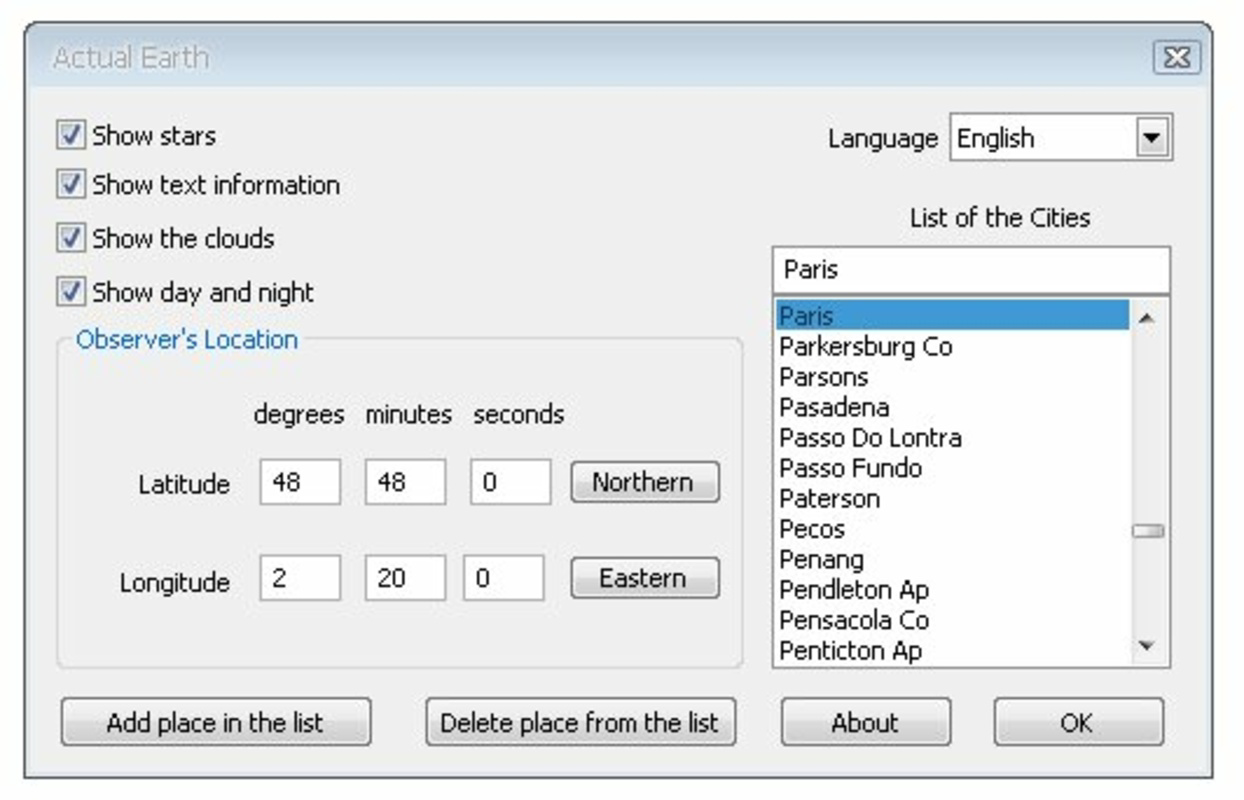
- Customizable View: Users can toggle visibility of stars, cloud layers, and other atmospheric effects to tailor the visual experience. This allows for a minimalist view or a rich, detailed cosmos display, depending on user preference.
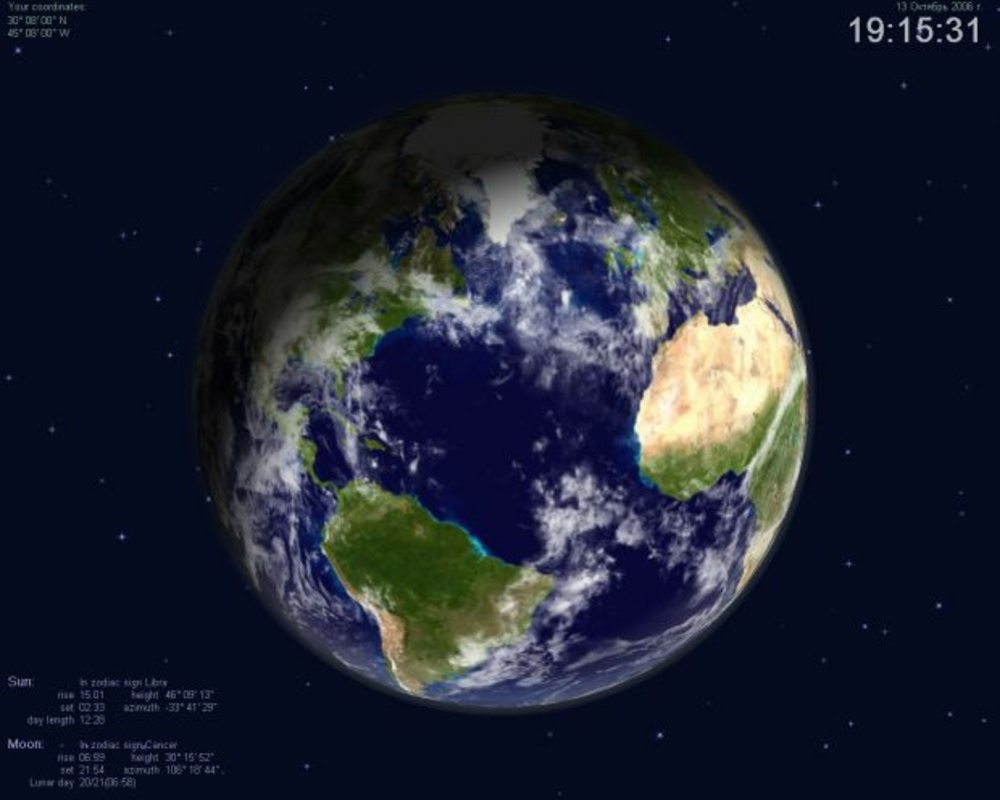
- Day and Night Cycle: The app simulates a realistic day and night transition across Earth’s surface, reflecting the actual position of the sun relative to the planet. This feature enhances immersion and provides a sense of real-time planetary motion.
- Multiple City Options: A built-in list of major global cities enables users to center the Earth view on their preferred location. This feature adds a personal touch and supports geographical curiosity, making it ideal for travelers or those with international connections.
- User-Friendly Configuration: The settings interface is intuitive, allowing users to adjust display parameters without technical expertise. Simple toggles and sliders make it easy to switch between modes, even for first-time users.
- Dynamic Rotation: Earth rotates smoothly in real time, providing a continuous, lifelike representation of the planet’s movement. This adds to the realism and visual appeal of the screensaver.
For example, a user in Tokyo can set the view to center on their city, watch the sun rise over Asia, and observe cloud patterns drifting across the Pacific. Similarly, someone in Paris can explore the night-time glow of Europe while the sun sets over Africa. These use cases demonstrate how the app blends personalization with global awareness, turning passive screen time into an engaging experience.
Interface, UX & Performance
The user interface of Actual Earth 3D is clean and focused, prioritizing visual clarity over clutter. The main screen displays the rotating Earth with minimal on-screen controls, ensuring that the central image remains the focal point. Navigation is straightforward, with a settings panel accessible through a simple menu, where users can adjust display elements and view preferences.
Visual style leans toward realism, with high-quality textures and smooth rendering that enhance the sense of depth and scale. The transition between day and night is seamless, and the cloud layer animation is fluid, contributing to an immersive atmosphere. The app is designed to run in the background during idle periods, minimizing interference with other tasks.
Although the developer did not list formal performance metrics, users should be aware that the app may perform sluggishly on older systems. This could manifest as reduced frame rates or delayed rendering, particularly when multiple visual effects are enabled. However, on modern devices, the experience is expected to be smooth and stable. Responsiveness is consistent across different screen sizes, and the app maintains stability during extended use.
Platform Compatibility & Technical Requirements
Actual Earth 3D is available for desktop platforms, with support confirmed for Windows operating systems. The app’s file size is approximately 14.5 MB, making it a lightweight installation for most users. Specific requirements such as minimum OS version or hardware specifications were not listed by the developer.
The developer did not specify minimum OS requirements or compatibility with mobile devices. As such, it is unclear whether the app is optimized for Android or iOS platforms. Users should verify system compatibility before installation, especially if using older or less powerful hardware. The app’s release date was July 13, 2010, indicating a long-standing presence in the digital space, which may suggest stability and proven performance over time.
Pros and Cons
Pros
- Visually stunning 3D representation of Earth with realistic day and night cycles
- Highly customizable settings for personalizing the viewing experience
- Ability to center the view on major cities worldwide
- Intuitive interface suitable for users of all technical skill levels
- Lightweight file size, making it easy to install and run
Cons
- May experience performance issues on older or low-end computers
- Developer did not provide detailed system requirements
- Platform availability for mobile devices remains unclear
- No information on update frequency or future development plans
- Limited to desktop use based on current available data
FAQ
Is Actual Earth 3D available for Android or iOS?
The developer did not specify platform availability for mobile operating systems. The app is confirmed for desktop use, and compatibility with Android or iOS devices has not been verified.
Can I use Actual Earth 3D as a live wallpaper on my smartphone?
There is no confirmed support for live wallpapers or mobile device integration. The app is designed primarily for desktop screensavers and may not function as intended on mobile platforms.
Does Actual Earth 3D require internet access to run?
The app does not require an active internet connection to operate. All visual data and animations are processed locally, ensuring privacy and consistent performance.
How often is Actual Earth 3D updated?
Specific update frequency was not provided by the developer. The app was released in 2010, and while it remains functional, there is no public information on current development or patch schedules.
Is Actual Earth 3D safe to download and install?
Based on the available information, the app is considered secure. However, users should download from official or trusted sources to avoid potential risks associated with third-party distribution.
Final Thoughts
Actual Earth 3D delivers a compelling blend of visual beauty and functional customization, offering users a serene and dynamic way to engage with Earth’s image. Its ability to simulate real-time day and night cycles, center on global cities, and adjust visual elements makes it a standout choice for desktop users seeking a peaceful, immersive screensaver. While performance may vary on older hardware, the app remains a lightweight and stable experience on modern systems.
It is best suited for individuals who value ambient digital art, geography enthusiasts, educators, and anyone looking to enhance their screen environment with a touch of cosmic wonder. The app’s long-standing presence in the market speaks to its reliability and enduring appeal. Despite limited technical details, its core functionality remains strong and relevant.
Download Actual Earth 3D now
Guides & Tutorials
How to install Actual Earth 3D
- Click the Download button above.
- Once redirected, accept the terms and click Install.
- Wait for the Actual Earth 3D download to finish on your device.
How to use Actual Earth 3D
This software is primarily used for its core features described above. Open the app after installation to explore its capabilities.
User Reviews
No reviews yet. Be the first to share your experience.
You may also like
more
Que no te pillen¡
About !Que no te pillen¡Reviewed by Jason A. BilbreyShow MoreShow Less

3D Combat Zone
About 3D Combat ZoneOriginally released in 1983, 3D Combat Zone immerses players...

666: El día del portal
About 666: El día del portalOn June 6, 2006, Agent P. Stone uncovers a sinister...

80 in 1 Best Flash games
About 80 in 1 Best Flash games 80 in 1 Best Flash games is a collection of 80 fl...

ABYSS SEEKERーーWhat Do You See Deep in The Abyss
About ABYSS SEEKERーーWhat Do You See Deep in The AbyssIn ABYSS SEEKER, players...

ACA NEOGEO THE KING OF FIGHTERS 2002 for Windows
About ACA NEOGEO THE KING OF FIGHTERS 2002 for WindowsTHE KING OF FIGHTERS 2002,...